Getting started with anndata#
Authors: Adam Gayoso, Alex Wolf
Note
This tutorial is based on a blog posts by Adam in 2021 and Alex in 2017.
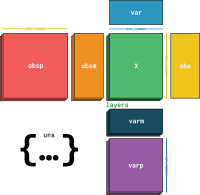
In this tutorial, we introduce basic properties of the central object, AnnData (“Annotated Data”).
AnnData is specifically designed for matrix-like data.
By this we mean that we have \(n\) observations, each of which can be represented as \(d\)-dimensional vectors, where each dimension corresponds to a variable or feature.
Both the rows and columns of this \(n \times d\) matrix are special in the sense that they are indexed.
For instance, in scRNA-seq data, each row corresponds to a cell with a barcode, and each column corresponds to a gene with a gene id. Furthermore, for each cell and each gene we might have additional metadata, like (1) donor information for each cell, or (2) alternative gene symbols for each gene. Finally, we might have other unstructured metadata like color palletes to use for plotting. Without going into every fancy Python-based data structure, we think that still today no other alternative really exists that:
Handles sparsity
Handles unstructured data
Handles observation- and feature-level metadata
Is user-friendly
from __future__ import annotations

from importlib.metadata import version

import numpy as np
import pandas as pd
from scipy.sparse import csr_matrix

import anndata as ad

version("anndata")
'0.13.0.dev180+ga7ba5620b.d20260513'
Initializing AnnData#
Let’s start by building a basic AnnData object with some sparse count information, perhaps representing gene expression counts.
counts = csr_matrix(np.random.poisson(1, size=(100, 2000)), dtype=np.float32)
adata = ad.AnnData(counts)
adata
AnnData object with n_obs × n_vars = 100 × 2000
    layers: None
We see that AnnData provides a representation with summary stastics of the data The initial data we passed are accessible as a sparse matrix using adata.X.
adata.X
<Compressed Sparse Row sparse matrix of dtype 'float32'
	with 126201 stored elements and shape (100, 2000)>
Now, we provide the index to both the obs and var axes using .obs_names (resp. .var_names).
adata.obs_names = [f"Cell_{i:d}" for i in range(adata.n_obs)]
adata.var_names = [f"Gene_{i:d}" for i in range(adata.n_vars)]
print(adata.obs_names[:10])
Index(['Cell_0', 'Cell_1', 'Cell_2', 'Cell_3', 'Cell_4', 'Cell_5', 'Cell_6',
       'Cell_7', 'Cell_8', 'Cell_9'],
      dtype='str')
Subsetting AnnData#
These index values can be used to subset the AnnData, which provides a view of the AnnData object.
We can imagine this to be useful to subset the AnnData to particular cell types or gene modules of interest.
The rules for subsetting AnnData are quite similar to that of a Pandas DataFrame.
You can use values in the obs/var_names, boolean masks, or cell index integers.
adata[["Cell_1", "Cell_10"], ["Gene_5", "Gene_1900"]]
View of AnnData object with n_obs × n_vars = 2 × 2
    layers: None
Adding aligned metadata#
Observation/Variable level#
So we have the core of our object and now we’d like to add metadata at both the observation and variable levels.
This is pretty simple with AnnData, both adata.obs and adata.var are Pandas DataFrames.
ct = np.random.choice(["B", "T", "Monocyte"], size=(adata.n_obs,))
adata.obs["cell_type"] = pd.Categorical(ct)  # Categoricals are preferred for efficiency
adata.obs
| cell_type | |
|---|---|
| Cell_0 | T |
| Cell_1 | Monocyte |
| Cell_2 | B |
| Cell_3 | Monocyte |
| Cell_4 | B |
| ... | ... |
| Cell_95 | Monocyte |
| Cell_96 | Monocyte |
| Cell_97 | B |
| Cell_98 | T |
| Cell_99 | B |
100 rows × 1 columns
We can also see now that the AnnData representation has been updated:
adata
AnnData object with n_obs × n_vars = 100 × 2000
    obs: 'cell_type'
    layers: None
Subsetting using metadata#
We can also subset the AnnData using these randomly generated cell types:
bdata = adata[adata.obs.cell_type == "B"]
bdata
View of AnnData object with n_obs × n_vars = 36 × 2000
    obs: 'cell_type'
    layers: None
Observation/variable-level matrices#
We might also have metadata at either level that has many dimensions to it, such as a UMAP embedding of the data.
For this type of metadata, AnnData has the .obsm/.varm attributes.
We use keys to identify the different matrices we insert.
The restriction of .obsm/.varm are that .obsm matrices must length equal to the number of observations as .n_obs and .varm matrices must length equal to .n_vars.
They can each independently have different number of dimensions.
Let’s start with a randomly generated matrix that we can interpret as a UMAP embedding of the data we’d like to store, as well as some random gene-level metadata:
adata.obsm["X_umap"] = np.random.normal(0, 1, size=(adata.n_obs, 2))
adata.varm["gene_stuff"] = np.random.normal(0, 1, size=(adata.n_vars, 5))
adata.obsm
AxisArrays with keys: 'X_umap'
Again, the AnnData representation is updated.
adata
AnnData object with n_obs × n_vars = 100 × 2000
    obs: 'cell_type'
    obsm: 'X_umap'
    varm: 'gene_stuff'
    layers: None
A few more notes about .obsm/.varm
The “array-like” metadata can originate from a Pandas DataFrame, scipy sparse matrix, or numpy dense array.
When using scanpy, their values (columns) are not easily plotted, where instead items from
.obsare easily plotted on, e.g., UMAP plots.
Unstructured metadata#
AnnData has .uns, which allows for any unstructured metadata.
This can be anything, like a list or a dictionary with some general information that was useful in the analysis of our data.
adata.uns["random"] = [1, 2, 3]
adata.uns
OrderedDict([('random', [1, 2, 3])])
Layers#
Finally, we may have different forms of our original core data, perhaps one that is normalized and one that is not. These can be stored in different layers in AnnData. For example, let’s log transform the original data and store it in a layer:
adata.layers["log_transformed"] = np.log1p(adata.X)
adata
AnnData object with n_obs × n_vars = 100 × 2000
    obs: 'cell_type'
    uns: 'random'
    obsm: 'X_umap'
    varm: 'gene_stuff'
    layers: None, 'log_transformed'
Conversion to DataFrames#
We can also ask AnnData to return us a DataFrame from one of the layers:
adata.to_df(layer="log_transformed")
| Gene_0 | Gene_1 | Gene_2 | Gene_3 | Gene_4 | Gene_5 | Gene_6 | Gene_7 | Gene_8 | Gene_9 | ... | Gene_1990 | Gene_1991 | Gene_1992 | Gene_1993 | Gene_1994 | Gene_1995 | Gene_1996 | Gene_1997 | Gene_1998 | Gene_1999 | |
|---|---|---|---|---|---|---|---|---|---|---|---|---|---|---|---|---|---|---|---|---|---|
| Cell_0 | 1.098612 | 0.693147 | 0.693147 | 0.000000 | 0.000000 | 1.098612 | 0.000000 | 0.000000 | 1.386294 | 0.000000 | ... | 1.386294 | 0.693147 | 1.098612 | 1.098612 | 1.098612 | 0.693147 | 1.386294 | 0.693147 | 0.000000 | 0.000000 |
| Cell_1 | 0.693147 | 0.000000 | 1.098612 | 0.000000 | 0.000000 | 0.000000 | 0.693147 | 0.693147 | 0.693147 | 0.000000 | ... | 0.000000 | 0.693147 | 1.098612 | 0.693147 | 0.000000 | 0.000000 | 1.098612 | 0.693147 | 0.693147 | 0.693147 |
| Cell_2 | 0.693147 | 0.000000 | 0.693147 | 0.000000 | 0.693147 | 0.000000 | 0.000000 | 1.386294 | 0.693147 | 1.098612 | ... | 0.693147 | 0.693147 | 0.693147 | 0.000000 | 0.693147 | 0.693147 | 0.000000 | 0.000000 | 0.000000 | 0.000000 |
| Cell_3 | 1.386294 | 0.693147 | 1.098612 | 0.000000 | 0.000000 | 0.693147 | 0.693147 | 0.000000 | 0.693147 | 0.693147 | ... | 0.000000 | 1.386294 | 0.693147 | 1.098612 | 0.000000 | 0.000000 | 0.693147 | 0.693147 | 0.693147 | 0.000000 |
| Cell_4 | 0.000000 | 0.000000 | 1.386294 | 0.693147 | 0.693147 | 0.693147 | 0.693147 | 0.693147 | 0.693147 | 1.098612 | ... | 0.693147 | 0.000000 | 0.000000 | 0.693147 | 1.098612 | 1.098612 | 0.693147 | 0.693147 | 1.098612 | 0.000000 |
| ... | ... | ... | ... | ... | ... | ... | ... | ... | ... | ... | ... | ... | ... | ... | ... | ... | ... | ... | ... | ... | ... |
| Cell_95 | 0.693147 | 0.693147 | 0.000000 | 0.000000 | 0.000000 | 0.693147 | 1.098612 | 1.098612 | 0.000000 | 0.693147 | ... | 0.000000 | 0.000000 | 1.098612 | 0.693147 | 0.693147 | 0.693147 | 0.693147 | 0.000000 | 0.000000 | 0.000000 |
| Cell_96 | 0.000000 | 1.098612 | 1.098612 | 0.000000 | 1.386294 | 0.693147 | 0.693147 | 0.693147 | 1.098612 | 0.000000 | ... | 0.000000 | 0.000000 | 1.098612 | 0.000000 | 0.000000 | 0.693147 | 0.693147 | 0.693147 | 1.098612 | 1.386294 |
| Cell_97 | 0.693147 | 1.098612 | 0.693147 | 0.693147 | 0.000000 | 0.693147 | 1.098612 | 0.693147 | 1.386294 | 0.693147 | ... | 0.693147 | 0.693147 | 0.000000 | 0.000000 | 0.000000 | 0.000000 | 0.000000 | 0.693147 | 0.693147 | 1.386294 |
| Cell_98 | 0.000000 | 0.693147 | 0.693147 | 0.693147 | 0.693147 | 1.098612 | 0.693147 | 0.000000 | 0.000000 | 0.000000 | ... | 0.000000 | 0.000000 | 0.693147 | 1.609438 | 1.386294 | 0.000000 | 0.000000 | 0.000000 | 0.693147 | 0.693147 |
| Cell_99 | 0.000000 | 0.693147 | 0.000000 | 0.693147 | 0.693147 | 0.000000 | 0.693147 | 0.000000 | 0.693147 | 0.000000 | ... | 0.000000 | 1.098612 | 1.098612 | 1.098612 | 1.098612 | 0.000000 | 0.000000 | 0.000000 | 0.000000 | 0.000000 |
100 rows × 2000 columns
We see that the .obs_names/.var_names are used in the creation of this Pandas object.
Writing the results to disk#
AnnData comes with its own persistent zarr-based file format in addition to an h5 backed format, h5ad.
We recommend zarr for a few reasons and offer some guidelines on how to use it well in our zarr-v3 Guide/Roadmap.
zarr generally has much better performance than h5 thanks to its directory structure/inherent-parallelism and can be further accelerated via zarrs (which will be used by default if installed as of anndata>=0.13 in anndata.AnnData.write_zarr() and anndata.io.read_zarr()).
zarr is also a cloud-native format featuring an async backend (see Lazily Accessing Remotely Stored Data).
By contrast, h5 files are neither cloud native nor parallelized for reads/writes.
Zarr stores, despite being directories of small-ish files (in contrast to single-file h5 files), are by default sharded as of anndata>=0.13 and thus should not overwhelm filesystems or produce more than a few dozen files for most datasets.
You can also zip zarr files up, manually or by using a ZipStore to achieve single-file usage.
adata.write_zarr("my_results.zarr")
adata.write_h5ad("my_results.h5ad")
!ls 'my_results.zarr'
X layers obs obsm obsp raw uns var varm varp
Wrapping up the introduction#
AnnData has become the standard for single-cell analysis in Python and for good reason – it’s straightforward to use and faciliatates more reproducible analyses with it’s key-based storage. It’s even becoming easier to convert to the popular R-based formats for single-cell analysis.
Keep reading on to better understand “views”, on-disk backing, and other details.
Views and copies#
For the fun of it, let’s look at another metadata use case. Imagine that the observations come from instruments characterizing 10 readouts in a multi-year study with samples taken from different subjects at different sites. We’d typically get that information in some format and then store it in a DataFrame:
obs_meta = pd.DataFrame(
    {
        "time_yr": np.random.choice([0, 2, 4, 8], adata.n_obs),
        "subject_id": np.random.choice(
            ["subject 1", "subject 2", "subject 4", "subject 8"], adata.n_obs
        ),
        "instrument_type": np.random.choice(["type a", "type b"], adata.n_obs),
        "site": np.random.choice(["site x", "site y"], adata.n_obs),
    },
    index=adata.obs.index,  # these are the same IDs of observations as above!
)
This is how we join the readout data with the metadata.
Of course, the first argument of the following call for X could also just be a DataFrame.
adata = ad.AnnData(adata.X, obs=obs_meta, var=adata.var)
Now we again have a single data container that keeps track of everything.
print(adata)
AnnData object with n_obs × n_vars = 100 × 2000
    obs: 'time_yr', 'subject_id', 'instrument_type', 'site'
    layers: None
Subsetting the joint data matrix can be important to focus on subsets of variables or observations, or to define train-test splits for a machine learning model.
Note
Similar to numpy arrays, AnnData objects can either hold actual data or reference another AnnData object.
In the later case, they are referred to as “view”.
Subsetting AnnData objects always returns views, which has two advantages:
no new memory is allocated
it is possible to modify the underlying AnnData object
You can get an actual AnnData object from a view by calling .copy() on the view.
Usually, this is not necessary, as any modification of elements of a view (calling .[] on an attribute of the view) internally calls .copy() and makes the view an AnnData object that holds actual data.
See the example below.
adata
AnnData object with n_obs × n_vars = 100 × 2000
    obs: 'time_yr', 'subject_id', 'instrument_type', 'site'
    layers: None
Get access to the first 5 rows for two variables.
Note
Indexing into AnnData will assume that integer arguments to [] behave like .iloc in pandas, whereas string arguments behave like .loc. AnnData always assumes string indices.
adata[:5, ["Gene_1", "Gene_3"]]
View of AnnData object with n_obs × n_vars = 5 × 2
    obs: 'time_yr', 'subject_id', 'instrument_type', 'site'
    layers: None
This is a view!
If we want an AnnData that holds the data in memory, let’s call .copy()
adata_subset = adata[:5, ["Gene_1", "Gene_3"]].copy()
If you try to access parts of a view of an AnnData, the content will be auto-copied and a data-storing object will be generated.
adata_subset = adata[:3, ["Gene_1", "Gene_2"]]
adata_subset
View of AnnData object with n_obs × n_vars = 3 × 2
    obs: 'time_yr', 'subject_id', 'instrument_type', 'site'
    layers: None
adata_subset.obs["foo"] = range(3)
/var/folders/k9/9wc7lvwj2g34_r74kn6cr0nr0000gn/T/ipykernel_12269/2955902014.py:1: ImplicitModificationWarning: Trying to modify attribute `.obs` of view, initializing view as actual.
  adata_subset.obs['foo'] = range(3)
Now adata_subset stores the actual data and is no longer just a reference to adata.
adata_subset
AnnData object with n_obs × n_vars = 3 × 2
    obs: 'time_yr', 'subject_id', 'instrument_type', 'site', 'foo'
    layers: None
Evidently, you can use all of pandas to slice with sequences or boolean indices.
adata[adata.obs.time_yr.isin([2, 4])].obs.head()
| time_yr | subject_id | instrument_type | site | |
|---|---|---|---|---|
| Cell_0 | 2 | subject 8 | type a | site y |
| Cell_2 | 2 | subject 1 | type b | site y |
| Cell_3 | 4 | subject 1 | type b | site y |
| Cell_4 | 2 | subject 1 | type a | site x |
| Cell_7 | 2 | subject 8 | type b | site y |
Partial reading of large data#
If a single .zarr/h5ad is very large, you can partially read it into memory by using a backed mode, or with anndata.experimental.read_lazy().
read_lazy gives dask objects which are more useful in conjunction with scanpy, which supports dask:
adata_backed = ad.read_h5ad("my_results.h5ad", backed="r")
adata_lazy = ad.experimental.read_lazy("my_results.zarr")
adata_backed.isbacked
True
adata_lazy.X
|
|||||||||||||
However, obs and var are also lazy objects (Dataset2D) that are not compatible yet with scanpy and need to be brought into memory:
adata_lazy.obs.ds
<xarray.Dataset> Size: 2kB
Dimensions:    (_index: 100)
Coordinates:
  * _index     (_index) object 800B 'Cell_0' 'Cell_1' ... 'Cell_98' 'Cell_99'
Data variables:
    cell_type  (_index) category 800B ...
Attributes:
is_backed: Trueadata_lazy.obs = adata_lazy.obs.to_memory()
adata_lazy.var = adata_lazy.var.to_memory()
If you do use backed mode and h5ad files, you’ll need to remember that the AnnData object has an open connection to the file used for reading:
adata_backed.filename
PosixPath('my_results.h5ad')
As we’re using it in read-only mode, we can’t damage anything. To proceed with this tutorial, we still need to explicitly close it:
adata_backed.file.close()
For this reason, we recommend lazy usage or constructing AnnData objects manually, which can be equivalent to backed mode:
import zarr

z = zarr.open("my_results.zarr")
adata_backed_zarr = ad.AnnData(
    X=ad.io.sparse_dataset(z["X"]),
    obs=ad.io.read_elem(z["obs"]),
    var=ad.io.read_elem(z["var"]),
)

adata_backed_zarr
AnnData object with n_obs × n_vars = 100 × 2000
    obs: 'cell_type'
    layers: None